I am trying to SVG XML documents with a mixture of lines and brief text snippets (two or three words typically). The major problem I'm having is getting the text aligning with line segments.
For horizontal alignment I can use text-anchor with left, middle or right. I can't find a equivalent for vertical alignment; alignment-baseline doesn't seem to do it, so at present I'm using dy="0.5ex" as a kludge for centre alignment.
Is there a proper manner for aligning with the vertical centre or top of the text?
-
Probably you can define your path and use it to layout the text as done in Text on a path layout rules
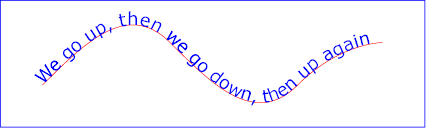 From Prakash
 -
Turns out that you don't need explicit text paths. Firefox 3 has only partial support of the vertical alignment tags (see this thread). It also seems that dominant-baseline only works when applied as a style whereas text-anchor can be part of the style or a tag attribute.
<path d="M10, 20 L17, 20"
      style="fill:none; color:black; stroke:black; stroke-width:1.00"/>
<text fill="black" font-family="sans-serif" font-size="16"
      x="27" y="20" style="dominant-baseline: central;">
  Vertical
</text>

<path d="M60, 40 L60, 47"
      style="fill:none; color:red; stroke:red; stroke-width:1.00"/>
<text fill="red" font-family="sans-serif" font-size="16"
      x="60" y="70" style="text-anchor: middle;">
  Horizontal
</text>

<path d="M60, 90 L60, 97"
      style="fill:none; color:blue; stroke:blue; stroke-width:1.00"/>
<text fill="blue" font-family="sans-serif" font-size="16"
      x="60" y="97" style="text-anchor: middle; dominant-baseline: hanging;">
  Bit of Both
</text>
This works in Firefox, unfortunately Inkscape doesn't seem to handle dominant-baseline (or at least not in the same way).
From Ian G -
Using inkscape you can get the size of any element. You can then align that element according to the measurements that you get from inkscape.
From Milhous


0 comments:
Post a Comment